Welcome to the School of Education at the University of West Florida. The School of Education provides comprehensive programs for both aspiring educators and seasoned professionals, offering a blend of initial teacher preparation courses and advanced degree programs. Our curriculum is designed to empower graduates to excel as teachers, principals, and educational leaders, positively impacting the lives of individuals they encounter along their educational and professional journeys.


School of Education
A Welcome from the Dean
Dr. Denise A. Soares
At the University of West Florida, particularly within the School of Education, we believe in the transformative power of higher education. The School of Education encompasses four departments: the Department of Teaching, Leadership, and Research (TLR), the Department of Instructional Design and Technology (IDT), TeacherReady, and the Center for Behavior Analysis.
Together, we unite in a shared vision to empower aspiring educators and experienced professionals. By exploring our website, you will discover that, alongside our array of teacher and administrator certification programs, we offer a variety of degree programs leading to Bachelor's, Master’s, Specialist, or Doctoral degrees designed to prepare you for an exciting career in various settings.

UWF Leads the Nation: Our Special Education Program Ranked #1 by Forbes Advisor for 2025
UWF's School of Education is incredibly proud to announce that our Exceptional Student and Elementary Education program has been ranked #1 in the nation by Forbes Advisor for 2025. This top distinction reflects our unwavering commitment to excellence in preparing the next generation of versatile, dually-certified educators to make a lasting impact in the classroom.

Top 50 for 2025 Affordable Education & Teaching Colleges
We are proud to be recognized by University HQ as one of the Top 50 Most Affordable Education & Teaching Colleges in the nation for 2025. This ranking reflects our commitment to providing high-quality, accessible pathways for the next generation of educators.

All initial teacher certification programs, along with the master's programs in Educational Leadership and Reading, are accredited based on the Council for the Accreditation of Educator Preparation (CAEP) standards through Spring 2030. CAEP is the only CHEA-recognized national accreditor for educator preparation.

The University of West Florida is a member institution of the Carnegie Project for the Education Doctorate (CPED). This selective membership includes colleges and universities committed to undertaking a critical examination on the education doctorate through dialog, experimentation, critical feedback, and evaluation.

Most Affordable Online Education Degree 2026
We are honored to be selected by OnlineU as one of the Most Affordable Online Education Degrees for 2026. This ranking is a reflection of our dedication to preparing future educators through accessible, high-quality learning opportunities. Affordable. Flexible. Designed for those called to teach.
Academic Edge Advising Blog

Welcome to the School of Education’s Academic Edge Advising Blog, your one-stop shop for all things academic success!
I'm Jenny Feysa, the Director of Advising, and I'm so excited to connect with you here.
Whether you're a brand-new student just starting your academic journey or a seasoned graduate student preparing for graduation, this blog is designed to be your go-to resource.
UWF-Teach
Your journey to become a certified middle or high school teacher starts here! The UWF-Teach program offers hands-on experience teaching students in various settings, guided by experienced mentors. Whether you're passionate about science, math, or education, UWF-Teach provides a platform to share your skills and explore the rewarding world of teaching. Join us in our mission to cultivate highly qualified STEM educators and expand our learning community. For more details, check out the RISE NOYCE Outcome Report.

The Learning Sciences Institute (LSI) empowers faculty and students with cutting-edge technologies like virtual reality, augmented reality, AI, and simulations to enhance teaching and learning. Through research and hands-on application, LSI creates immersive educational experiences that improve engagement, accessibility, and real-world skill development. Explore the future of learning today!

The VirTra 300 LE training simulator at the Center for Behavior Analysis offers immersive, real-world law enforcement training, integrating behavioral science and tactical decision-making. With dynamic scenarios, it enhances situational awareness, de-escalation, and crisis response. Educators and community leaders can also engage, fostering collaboration on campus safety and emergency preparedness. Experience VirTra today!

TeacherReady! Earn Your Teaching Certification Online!
For over 20 years, TeacherReady has helped professionals, veterans, and recent graduates become certified teachers in 30+ subjects worldwide. Our online program provides practical, modern teaching strategies to make an immediate impact in the classroom. Start your journey today!

Para to Teacher Support Program
The Para to Teacher Support Program offers financial aid to Florida public school paraprofessionals pursuing degrees in special education, deaf education, or visual disabilities. Take the first step toward certification and a rewarding teaching career through this "Grow Your Own" opportunity.

Gain Experience with CSAA Graduate Assistantships
Enhance your resume with compensated assistantships in university departments and hands-on internships in areas like admissions and student accessibility. Build real-world skills and advance your career in student affairs administration.

School of Education Teacher Pinning Ceremony
Twice a year, the University of West Florida's School of Education hosts a traditional Teacher Pinning Ceremony, marking a significant milestone in the journey of aspiring educators. This time-honored tradition symbolizes the culmination of rigorous academic preparation and hands-on clinical experiences, as teacher candidates transition into certified professionals ready to positively impact the lives of K-12 students.

Emerald Coast Writing Project
Educators gathered at the UWF Center for Fine and Performing Arts to celebrate 50 years of the National Writing Project. Hosted by Dr. Susan James and the Emerald Coast Writing Project, the event highlighted how teachers are integrating NWP strategies into their classrooms, fostering a love of writing and literacy.
School of Education News
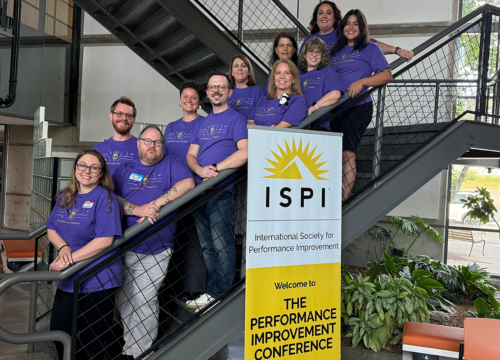
UWF IDT students earn top honors at ISPI Case Study Competition
Two teams from the University of West Florida’s Department of Instructional Design and Technology, housed in the School of Education, earned top honors in the 2026 International Society for Performance Improvement Case Study Student Competition in Nashville, Tennessee, placing first and third. This is the second year in a row that a UWF team has won the competition.

UWF professor honored with prestigious national mentoring award
University of West Florida’s Dr. Giang-Nguyen Nguyen, professor in the UWF School of Education, was named the recipient of the Duaine C. Lang Distinguished Mentoring Award presented by the Leadership Foundation for Teacher Education. The national award recognizes Nguyen’s extraordinary commitment to mentorship within the Association of Teacher Educators.

UWF School of Education receives $579K NSF grant, leads national STEM teacher preparation project
The University of West Florida School of Education has received a $578,792 grant from the National Science Foundation to lead a collaborative project aimed at improving undergraduate teacher education in the fields of science, technology, engineering and math. This is part of a larger $1,498,899 grant awarded across five universities.